
MOOV text messaging
Last updated 29 October 2026
MOOV Events Inc. runs the MOOV text messaging program. This page explains what we text, how you sign up, how often we text, and how to stop.
Texts are sent by MOOV Events Inc. under the name MOOV. They only go to MOOV users who have turned on text alerts and confirmed their mobile number.
What we text
MOOV is an operations platform for outdoor events such as races, rides and parades. Our texts are about events you are part of:
Emergency alerts. When someone working an event presses its Emergency button, the event team is alerted by text.
Team alerts and event updates. Organizers can send alerts to the team working an event, including updates and reminders for events you are part of.
Verification codes. A 6-digit code that confirms your mobile number when you turn on text alerts.
How to sign up
Text alerts are off until you turn them on yourself. You need a MOOV account, and you can only add your own mobile number.
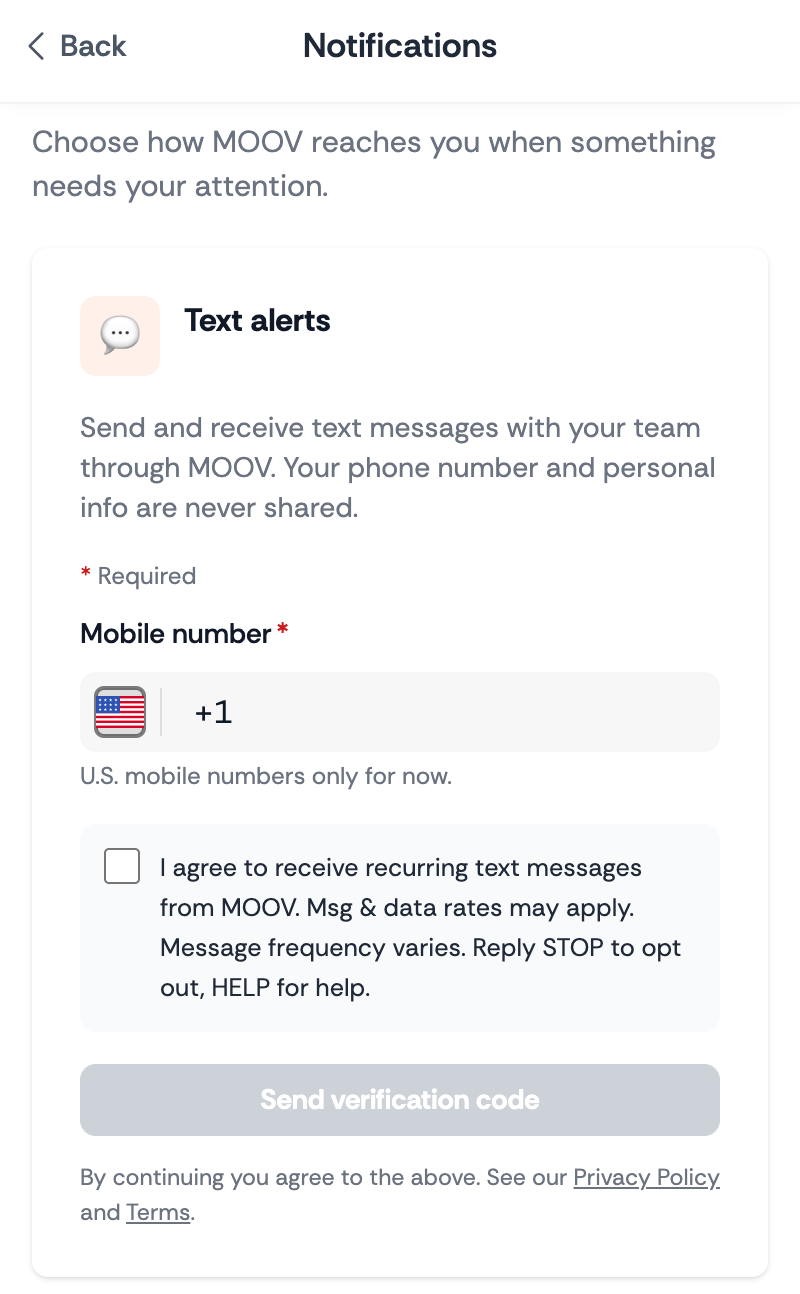
1. Open your settings. Sign in to MOOV and go to Settings, then Preferences (on a computer) or Notifications (on a phone). Find the Text alerts card.
2. Enter your mobile number and agree. Under the number field, MOOV shows this statement with a checkbox. You must tick it before you can go on:
"I agree to receive recurring text messages from MOOV. Msg & data rates may apply. Message frequency varies. Reply STOP to opt out, HELP for help."
3. Confirm your number. Choose Send verification code. MOOV texts a 6-digit code to the number. Enter it and choose Confirm & turn on. Text alerts are now on.
You can turn text alerts off at any time in the same place.
How often we text
Message frequency varies. It depends on the events you are part of and what happens during them.
Cost
Msg & data rates may apply, depending on your mobile plan.
Stop, help and start again
To stop: reply STOP to any MOOV text. You can also turn text alerts off in your MOOV settings.
For help: reply HELP to any MOOV text, or email support@moovevents.ai.
To start again: reply START after stopping, or turn text alerts back on in your MOOV settings.
Carriers
Carriers are not liable for delayed or undelivered messages.
Your mobile number and privacy
No mobile information will be shared with third parties or affiliates for marketing or promotional purposes. Text messaging originator opt-in data and consent will not be shared with any third parties.
We use your number only to send the texts described on this page. Read more in our Privacy policy and Terms.
Questions
Email support@moovevents.ai, or reply HELP to any MOOV text.
Using the MOOV product itself? That is covered by the MOOV platform terms. Both platform documents are also linked from app.moovevents.ai.